



Introduction – When the Homelab Meets the Kitchen
Every self-hosting enthusiast knows the feeling. That sheer satisfaction when, after a few terminal commands or a single click in the TrueNAS Scale interface, you spin up a new Docker container that solves a real, everyday problem. For years, we’ve been building our home servers to regain control over our data, become independent from big corporations, and tailor technology to our needs, not the other way around. We’ve tackled media servers, file clouds, and home automation systems. But what about one of the most chaotic, yet crucial, places in any home – the kitchen?

My search for the perfect, self-hosted tool to manage culinary chaos was a long one. Until now. The answer turned out to be KitchenOwl, available as an official app in the TrueNAS Scale catalogue, which makes its installation dead simple. This isn’t just another digital cookbook. It’s an integrated ecosystem for managing recipes, planning meals, creating shopping lists, and even tracking household finances – all on my own hardware, with a full guarantee of privacy.
The presence of such polished software in official repositories, like the one from TrueNAS, is a sign that the self-hosting movement has matured. We are moving beyond purely technical tools and entering the realm of ‘home technology’, creating a real alternative to commercial, cloud-based services. KitchenOwl is a perfect example of this trend – it’s an application for savvy users who want to regain control over their data, even when it comes to their shopping list.
The Magic of the First Click – Recipes Like You’ve Never Seen Before
My first few moments with KitchenOwl delivered a ‘wow’ factor that’s rarely found even in the world of polished commercial applications. What immediately stands out is the incredible intelligence and thoughtful approach to recipe management.
Automatic Recipe Scraping
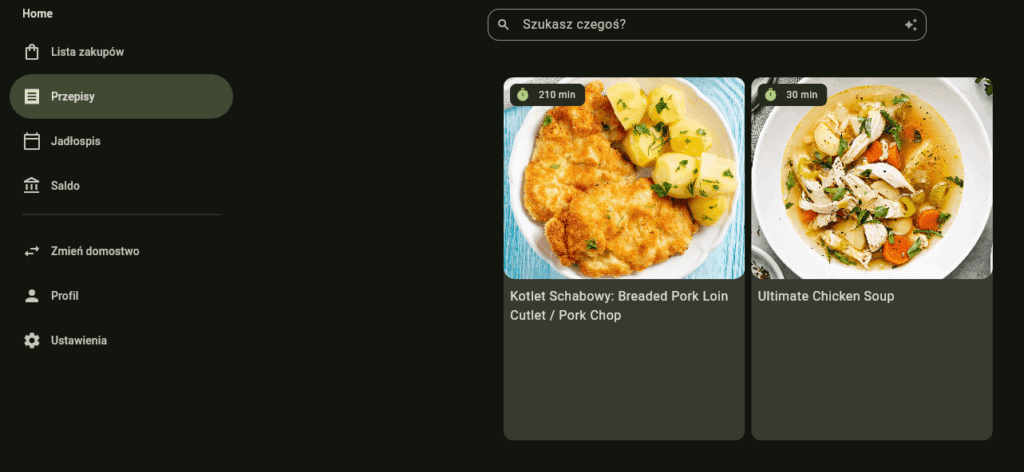
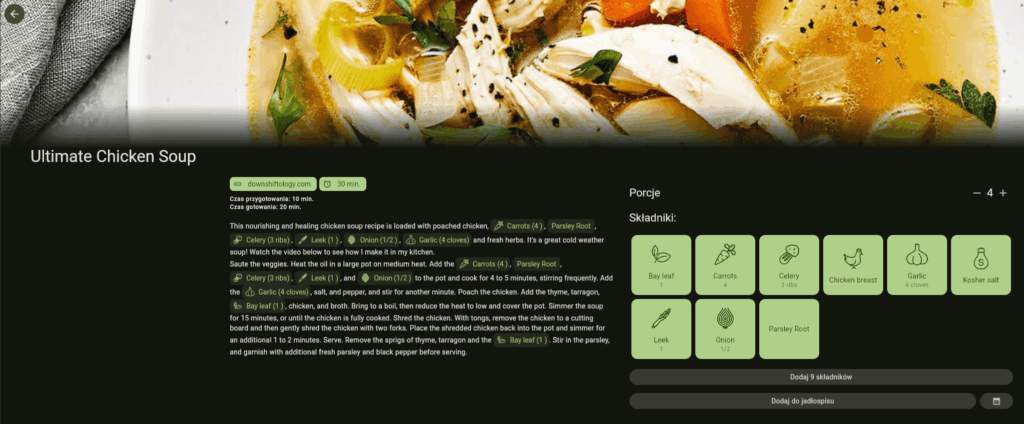
Forget the tedious copying and pasting of ingredients and instructions. I discovered that you just need to paste a link to a recipe page, and KitchenOwl does all the work for you. This function, known in tech jargon as ‘web scraping’, intelligently analyses the website’s structure to automatically import the dish’s name, preparation and cooking times, ingredient list, step-by-step instructions, and even a photo. It’s a huge time-saver and an absolute game-changer in the way recipes are collected. While some websites – especially those using complex DOM structures – aren’t compatible with KitchenOwl, a vast number of recipe sites are fully supported.
Dynamic Portion Scaling
This is a simple but brilliant feature. Every recipe has a defined number of servings. But what if you’re expecting guests or just cooking for yourself? In KitchenOwl, a single click is all it takes to change the number of servings – from 4 to 6, for instance – and the app automatically recalculates the quantities of all ingredients. No more mental arithmetic or the risk of making a mistake with complicated recipes.
Interactive Cooking Mode
After selecting a recipe and clicking the ‘Start’ icon, the magic happens. The app switches to a full-screen cooking mode which guides you through the recipe step by step. With a single click, you can increase or decrease the font size, so the recipe is legible on both a tablet and a phone. All ingredients are highlighted to be clearly visible. It’s the perfect solution for when your hands are covered in flour – no need to scroll or touch the screen, which minimises mess and lets you keep up the pace in the kitchen.
Advanced Formatting with Markdown
For more advanced users who like to have everything perfectly formatted, KitchenOwl offers support for Markdown syntax in recipe descriptions. You can create headings, and bulleted or numbered lists. A particularly interesting feature is the ‘ingredient pills’. By typing @ingredient_name in the instruction text, you create a highlighted ingredient and add a clear icon to it, which further organises the recipe and makes it easier to read.
These features show that KitchenOwl’s creators have a deep understanding of the entire cooking process – from finding inspiration, through preparation, to the final execution. This isn’t just a database; it’s a digital sous-chef that actively helps at every stage.
From Plan to Plate – Smart Meal Plans and Shopping Lists
Having hundreds of recipes is one thing, but the real challenge is planning what to eat in the coming week and how to do the shopping efficiently. KitchenOwl combines these elements into a single, cohesive, and intelligent system.
Planning with the “Meal Plan”
The ‘Meal Plan’ tab is a powerful tool for planning meals. It works like a calendar onto which you can drag and drop your saved recipes, assigning them to specific days. This allows you to create a plan for the entire week or even a month, giving a clear overview of what you’ll be eating. No more of the daily ‘what’s for dinner?’ dilemma.
The Smart Shopping List
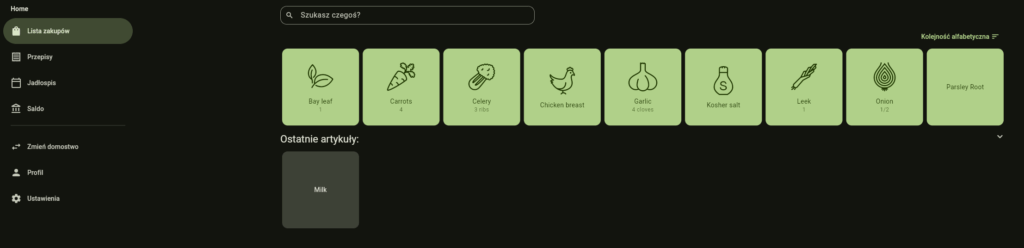
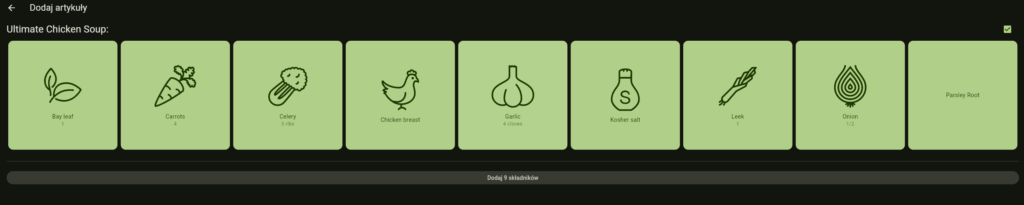
This is where the true power of integration becomes apparent. Once our meal plan is ready, we can generate a shopping list with a single click. Most importantly, the app allows you to add only the ingredients you’re missing. This suggests the existence of a simple stock management system – you tick off what you already have in the kitchen, and the rest goes on the list.
The shopping list in KitchenOwl is much more than a simple text file. Items are automatically categorised (e.g., dairy, vegetables, household chemicals), have icons, and precisely defined quantities. And crucially, the list syncs in real-time with all devices and members of the household. If one person in the shop puts the milk in the trolley and ticks it off the list, another person in a different aisle will see it immediately. It’s a simple solution that eliminates the problem of duplicate purchases.
This closed loop – from meal plan to a precisely generated shopping list – has huge secondary benefits. It helps to reduce food waste, as you buy only what you really need for the planned dishes. In turn, this also leads to more mindful and economical shopping, making KitchenOwl not just an organisational tool, but also an economic and eco-friendly one.
What is “Balance” and How It Manages Your Budget
One of the tabs is ‘Balance’. It holds one of the application’s most powerful features, one that goes far beyond just cooking.
“Balance”: Your Kitchen’s Financial Assistant
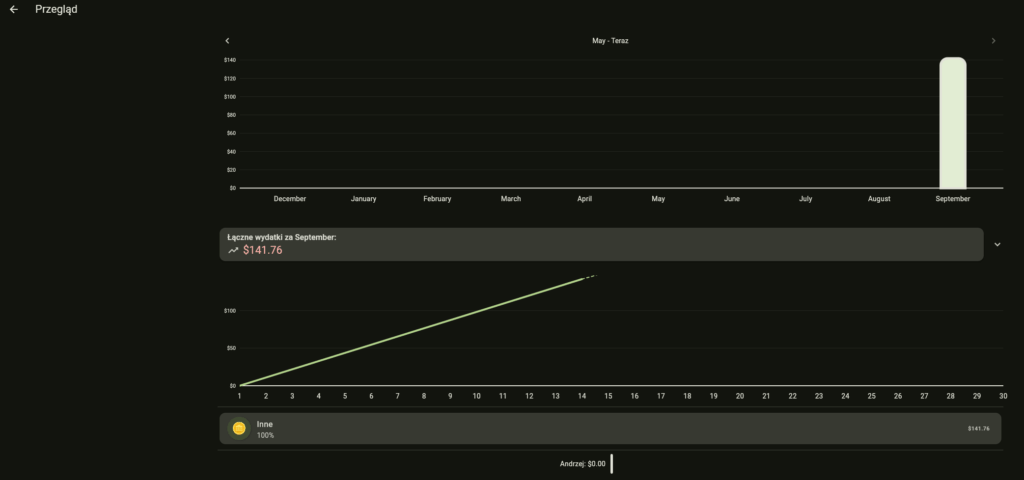
‘Balance’ is nothing less than a built-in system for tracking household expenses. The interface presents a monthly summary of costs, giving a clear insight into how much we’re spending. After every grocery shop, we can enter the amount from the receipt, and the app will do the rest, aggregating the data and helping us stay within our set budget.
The Power of Collaboration: Splitting Bills
The true potential of ‘Balance’ reveals itself when combined with the ‘Households’ feature (more on that in a moment). This system was designed with shared households in mind – for families or flatmates. It allows for easy and fair cost splitting among all members. If one person did the weekly shop for £60, they can log this expense and split it between two or three people. The system will automatically calculate who owes what to whom, eliminating awkward conversations and the need for external apps.
Although this tool is perfect for grocery shopping, there’s nothing to stop you from using it to track other shared expenses, like utility bills or rent. This makes KitchenOwl a lightweight but surprisingly functional tool for managing the entire home’s finances. Including this feature was a strategic decision by the creators, showing that they understand ‘kitchen management’ holistically – as a process that includes not just food, but also the logistics and finances associated with it. It is the ‘Balance’ feature that transforms KitchenOwl from a personal cooking assistant into a complete household management platform.
The Full Power of the Kitchen Owl – Features You Need to Know About
To fully appreciate the genius of KitchenOwl, you need to look at the foundations on which the entire application is built. These are what make all the previously described features work so smoothly and intuitively.
Collaboration is Key: The Power of “Households”
The concept of ‘Households’ is at the heart of KitchenOwl’s collaborative nature. A user can create a shared space and invite other family members or flatmates. Everyone within a single ‘household’ has access to the same recipe database, the same meal plan, a common shopping list, and a shared expense balance. All changes are synchronised in real-time, ensuring smooth and effective collaboration.
One Ecosystem, Many Devices
The creators of KitchenOwl have done a tremendous job to ensure a consistent experience across all platforms. The application is available as a native app for Android and iOS, as well as in web and desktop versions. This is a key advantage because, regardless of which device a family member uses, they have full access to data that is flawlessly synchronised. What’s more, the mobile apps have partial offline support, which is invaluable when shopping in a supermarket where mobile signal can be unreliable. Creating and maintaining native mobile apps is a huge investment, which is a rarity in the world of self-hosted projects. This demonstrates the developers’ commitment to delivering a top-quality product that can compete not only with other open-source solutions but also with paid, commercial counterparts.
The Philosophy of Open-Source and Self-Hosting
KitchenOwl is released under the AGPL-3.0 licence, which is hugely significant for the IT community. This means full transparency – the source code is open for anyone to inspect. It means freedom – we are not tied to a single provider. And above all, it means full ownership of our data – by running KitchenOwl on our own TrueNAS Scale server, we can be sure that our eating and shopping habits are not being analysed and monetised by an external company. The project is actively developed, as evidenced by regular updates and the large number of issues on GitHub, which points to a healthy and engaged community.
Integrations and Potential for Growth
For home automation enthusiasts, the absolute killer feature is the integration with Home Assistant. This opens the door to creating powerful automations. Imagine a scenario: ‘when I add milk to the shopping list, turn the smart bulb in the kitchen blue as a reminder’ or ‘when I start cooking a recipe in KitchenOwl, dim the lights and play my favourite playlist’. The potential is practically limitless.
The Verdict – A Complete System for Managing Your Culinary World
To sum up my journey with KitchenOwl, from the first imported recipe and planning a week’s menu, to settling up shared shopping bills, I can say with full confidence that it is a revolutionary tool. It is much more than the sum of its parts. It’s a cohesive, intelligent, and comprehensive ecosystem that brings order, savings, and harmony to one of the most important aspects of our lives.
KitchenOwl takes the mental load of daily planning off our shoulders, minimises food waste, helps control the budget, and, most importantly, facilitates collaboration within the household. For any self-hosting enthusiast who values privacy, control, and wants to use technology to genuinely improve their quality of life, installing KitchenOwl is a no-brainer.
To put KitchenOwl in a broader context, it’s worth comparing it to other popular self-hosted recipe management platforms, such as Mealie or Tandoor Recipes.
| Feature | KitchenOwl | Mealie | Tandoor Recipes |
| Recipe Scraping | Yes | Yes | Yes |
| Meal Planner | Yes | Yes | Yes |
| Automatic Shopping List | Yes | Yes | Yes |
| Integrated Expense Tracking | Yes | No | No |
| Native Mobile Apps (iOS/Android) | Yes | No (PWA only) | No (PWA only) |
| Collaboration (Multi-User / Households) | Yes | Yes | Yes |
| Home Assistant Integration | Yes | Yes | Yes |
| Open-Source Licence | AGPL-3.0 | MIT | MIT |
As you can see from the table above, although the basic recipe management and planning features are present in all the leading solutions, KitchenOwl stands out from the competition with two key elements: its built-in expense tracking module and its official, native mobile apps. These two features make it the most complete and polished solution, perfectly suited to the needs of a modern, tech-savvy household.
Leave a Reply